English
 中文简体
中文简体
Industry News
Two coworkers share the same model of office chair. One finishes a long afternoon feeling fine. The other keeps shifting, with a dull pressure behind the knees and a gap between the lower back and the backrest. The chair is identical. The fit is not. A Waist Support Chair works through the relationship between seat, backrest, and lumbar support, and each person's body meets those parts in a different place.
Why the Same Chair Fits People Differently
Two people of similar height can have very different proportions. One has a long torso and short legs, the other the reverse. That changes where the seat edge ends, where the backrest meets the spine, and where lumbar support lands.
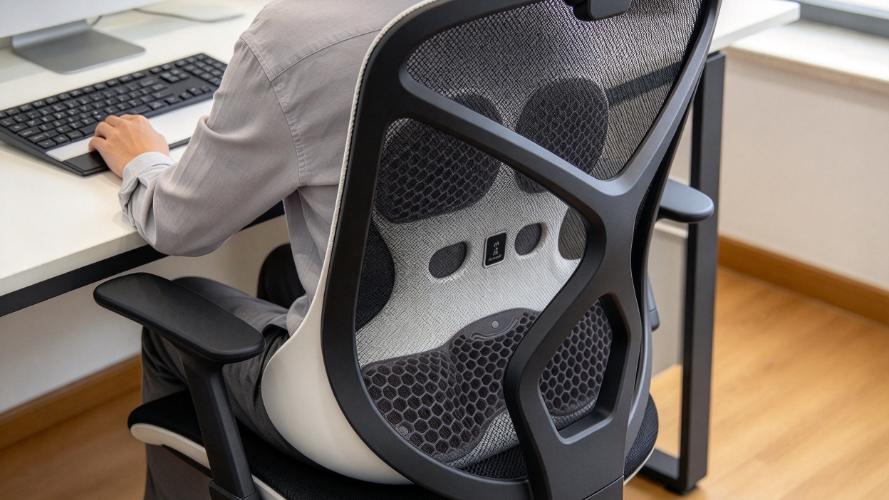
Habits matter too. Someone who works upright at a keyboard needs something different from a person who leans back during calls or while reading. Judge the seat, backrest, lumbar support, and armrests as a working set, not as separate features.
| User Difference | Effect on Comfort |
|---|---|
| Overall height | Influences seat height and backrest fit |
| Leg length | Affects foot placement and seat depth |
| Torso length | Changes where the back meets the lumbar support |
| Sitting posture | Decides where the back contacts the chair |
| Work habits | Shape the need for position changes |
These differences explain why one design can suit several people and still need individual adjustment.
The Seat: Height, Depth, and Feet
Height and Foot Placement
A seat set too high leaves feet dangling or resting on toes, which makes the position unstable and adds pressure under the thighs. A seat set too low raises the knees above the hips and can tilt the pelvis so the lower back loses contact with the backrest.
Aim for feet resting securely on the floor or a footrest, with the front edge of the seat not pressing into the thighs. Desk height complicates this. If the desk is too high, people raise the chair to reach it and lose foot support. A footrest or a change to the workstation then works better than another chair adjustment.
Depth
Seat depth decides how much thigh is supported and whether you can sit back fully. A seat that is too deep presses behind the knees, so people slide forward and leave a gap at the lower back. The lumbar support may be perfectly placed, yet the chair feels unsupportive. A seat that is too shallow leaves much of the thigh unsupported, which becomes tiring over a long session.
| Seat Depth | Likely Experience |
|---|---|
| Too deep | Pressure behind the knees, hard to reach the backrest |
| Too shallow | Little support beneath the thighs |
| Suitable | Back rests on the backrest while legs stay comfortable |
| Not adjustable | Fits some proportions better than others |
Adjustable depth helps when several people share a chair.
The Back: Lumbar Support and Backrest
Matching the Curve
Lumbar support should meet the curve of the lower back without forcing it. Placed too high, it presses the middle of the back. Placed too low, it presses near the pelvis and leaves the curve unsupported. Shape matters as well, because a firm bulge that suits one person feels like an obstacle to another.
To set it, sit back naturally, relax the shoulders, and move the support until it touches the lower back comfortably. Pushing it hard into the body for a stronger sensation does not improve support.
Adjustable Support
Height adjustment places the support at the natural curve. Some chairs also move the support forward or backward to change how strongly it contacts the body. These solve different problems, so check which ones your chair offers.
Adjustment has limits. Backrest shape, seat depth, and overall dimensions still shape the result. Controls also need to be reachable while seated, and the support should stay put during normal movement.
Backrest Height and Recline
A shorter backrest may suit one person and leave another without upper-back contact. A taller one covers more of the torso, but its lumbar section must still line up with the lower back. Evaluate height and lumbar position together.
For people who lean back often, recline should feel controlled and keep the lower back near the support.
Supports Change With Posture
Sitting position changes through the day. Upright typing, leaning back to read, and turning to talk each shift the contact point. A setting that feels right in one position may feel off in another, which reflects normal movement and not necessarily a defect. Look for a setup that works across your usual tasks and allows small position changes.
Armrests and Workstation
Armrests that sit too high keep shoulders raised while typing. Ones that sit too low encourage leaning to one side. A person who leans forward to reach the desk loses contact with the lumbar support, even if the chair is adjusted correctly.
Match armrest height to desk height and seat position so the arms rest without lifting the shoulders, and the chair can still move close to the work surface. Detailed desk work and mixed tasks call for different setups, so adjustable armrests add flexibility.
Adjusting Step by Step
Change one setting at a time so you can tell what helped.
- Set seat height so feet rest securely and legs feel relaxed.
- Check seat depth with your back against the backrest.
- Move the lumbar support to the natural curve of the lower back.
- Choose a backrest angle that supports the torso and allows movement.
- Set armrests so shoulders stay relaxed.
- Work normally for a while and note where discomfort appears.
Small changes over several days may be needed.
For Buyers and Designers
Choosing for Varied Users
Employees come in many proportions, and shared chairs meet all of them. Look at which parts actually adjust. A chair that changes only in height leaves depth, lumbar position, and armrests unresolved. Consider how long people sit, how often the chair is shared, and whether users can adjust it without help.
| Buying Consideration | Why It Matters |
|---|---|
| Seat height range | Accommodates different leg lengths |
| Adjustable seat depth | Suits varied thigh lengths |
| Lumbar adjustment | Aligns support with the lower back |
| Backrest movement | Allows changes in position |
| Armrest adjustment | Fits different desks and arm positions |
| Ease of adjustment | Helps users keep a suitable setup |
Try the chair where possible, or review its adjustment functions before ordering.
Designing for Different Bodies
Seat dimensions, backrest shape, and lumbar placement interact, so changing one alters how the others feel. A seat built around one body type feels too deep for a shorter-legged user, and a fixed lumbar support sits too high or too low for someone else. Adjustment widens the range of people a chair serves, though design still sets limits.
Useful user feedback names body proportions, sitting habits, and the exact area of discomfort, not just "comfortable" or "uncomfortable."
When to Change the Chair
If the seat stays too deep, the backrest too tall, or the lumbar support out of reach, more adjusting will not help. Repeated pressure behind the knees, trouble reaching the backrest, or support landing on the wrong spot suggests a mismatch between chair and body.
Check the workstation as well, including desk height, monitor position, keyboard placement, and foot support. If discomfort persists after reasonable changes, try a chair with different dimensions or better adjustment options. Persistent pain is not only a chair-fitting issue, and professional advice is appropriate.
 Previous